
Alarm System: Complete Security Solution for Homes & Businesses
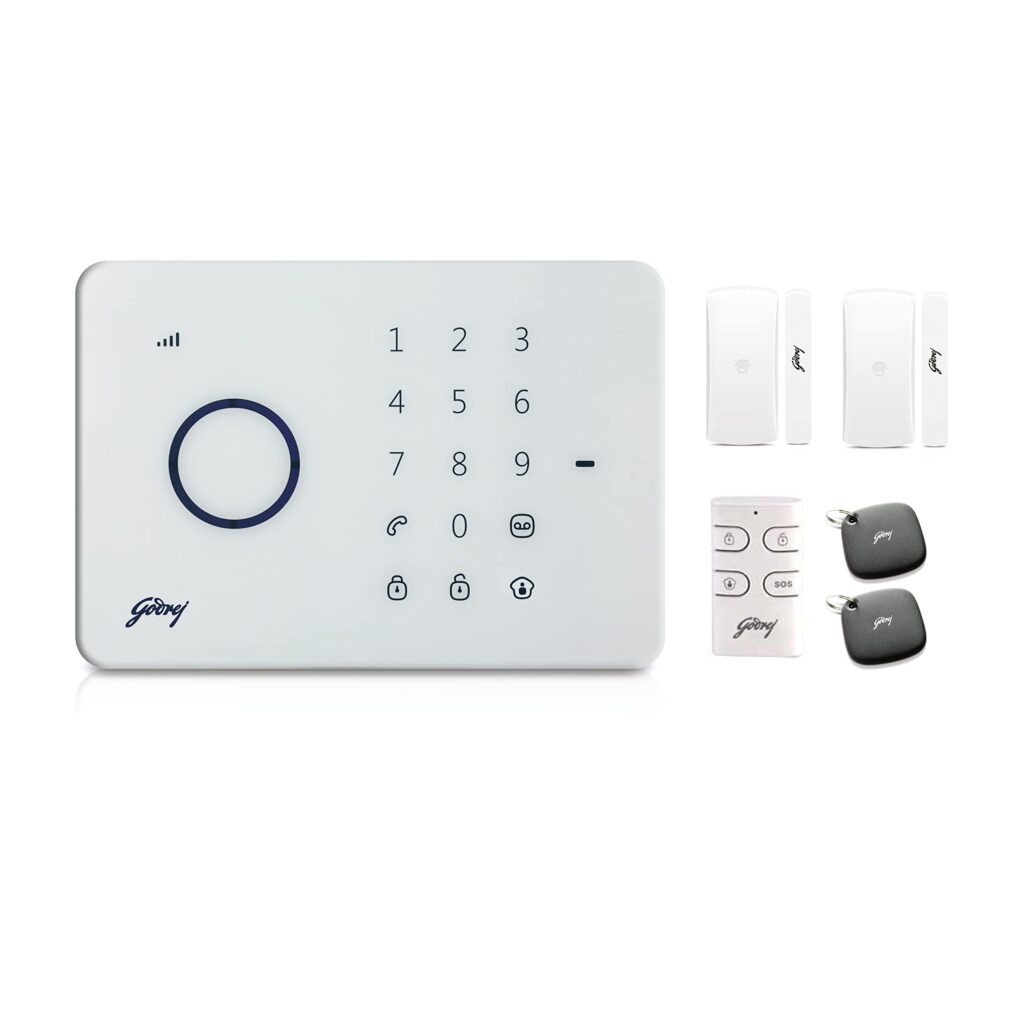
What is an Alarm System? An alarm system is a security device that detects unauthorized entry, theft, fire or other emergencies and immediately alerts property owners. It utilizes a variety of sensors and monitoring technology to detect suspicious activity and generate alerts via sirens, text or mobile phone alerts, or professional monitoring centers. Today the danger to security is increasing for homes, offices, warehouses, shops and industrial complexes. A good alarm system installation helps to keep people, property and valuables safe from potential risk. Whether you have a small house or a large commercial building, an alarm system will give you an extra layer of protection and peace of mind. How Does an Alarm System Work? An alarm system works through a combination of sensors, control panels, communication devices, and alert mechanisms. The process is easy: Doors, windows, rooms and other points of entry are monitored constantly by sensors. If the sensor detects any strange activity, it sends a signal to the control panel. The control panel looks at the signal and decides if it is a security threat. When a threat is detected, the system triggers alarms, sirens, mobile notifications, or monitoring services. The property owner or security team can act immediately. Modern smart alarm systems also offer instant alerts directly to smartphones, allowing users to keep an eye on their property from anywhere. Key Components of an Alarm System A modern alarm system consists of several important components that work together to provide complete protection. Control Panel The control panel is the brains of the alarm system. It receives data from all the connected sensors and determines what the system should do. Characteristics include: management of system Alarm triggering User management access Emergency Communications Device observation. Motion Sensors and PIR Detectors Motion sensors detect movement in protected areas. Passive infrared (PIR) sensors sense the infrared heat given off by a human or animal. When motion is detected, the sensor will send alarm signal to the control panel immediately. Motion sensors are usually installed in: LIVING ROOM Hallways Office cubicles Storages Retail outlets Door and Window Sensors The sensors have two parts that stay connected when the door or window is closed. If an unauthorized person opens the entry point, the connection is severed and the alarm goes off. Benefits are: Early Detection of Intrusions Better perimeter security Requires little maintenance Alarm Sirens and Sounders Sirens are meant to be blaring loud warning sounds when a threat is detected. The main objective of a siren is to: Keep intruders out Notify people nearby Faster response time Enhance security awareness Most modern alarm systems have sirens that can be used inside or out. Keypads and Remote Controls Keypads allow users to: Arm the system Disarm the system Configure settings Enter security codes Remote controls provide quick and convenient operation. Auto Dialers and Mobile Notifications Instant notification to the users of modern alarm systems via: Cell phone apps SMS messages Email alert Voice calls. Users can check in on their property from almost anywhere. Battery Backup Systems Never leave a property unprotected from power failures. Battery backup systems allow alarm systems to operate in the event of a power outage. This is particularly important for commercial and industrial facilities. Benefits of Installing an Alarm System Installing an alarm system provides numerous advantages for homeowners and businesses. Enhanced Security The system continuously monitors critical areas and detects potential threats before they escalate Reduced Risk of Theft Visible security systems discourage criminals from attempting unauthorized entry. Real-Time Monitoring Users can monitor their property from smartphones, tablets, or computers. Insurance Benefits Many insurance providers offer reduced premiums for properties equipped with advanced security systems. Improved Employee Safety Businesses can create safer working environments by implementing alarm systems. Better Asset Protection Valuable assets, equipment, inventory, and confidential information receive additional protection. Alarm System Integration with CCTV Cameras Alarm systems and CCTV cameras are most effective when combined with contemporary security systems. A sensor that detects suspicious activity Cameras record video automatically Instant notifications to the user Security teams can validate incidents Evidence is held for investigation This integration improves the security accuracy and reduces the false alarms. Conclusion An alarm system is one of the most effective ways to protect homes, offices, retail stores, warehouses, and industrial facilities. By detecting threats early and providing instant alerts, modern alarm systems help prevent theft, reduce security risks, and improve peace of mind. Whether you need a wired alarm system, wireless alarm system, smart alarm system, or integrated security solution, investing in a professional alarm system is an important step toward protecting your people, property, and assets. Frequently Asked Questions (FAQs) 1. What is an alarm system? Alarm system is a security solution that alerts users with sirens, mobile notifications or monitoring services when it detects unauthorized entry, movement or suspicious activity. It helps protect houses, offices, shops and industrial premises from theft and security risks. 2. How does an alarm system work? An alarm system consists of sensors located on doors, windows and other important areas. When a sensor detects unusual activity, it sends a signal to the control panel, which will trigger an alarm and alert the property owner. 3. What are the main types of alarm systems? The most common alarm systems include: Wired Security Systems Wireless Security Systems Hybrid Security Systems Smart Security Systems Different types have different features based on security needs and budget. 4. Which is better: a wired or wireless alarm system? Wired alarm systems are highly reliable and suitable for new construction projects. Wireless alarm systems are easier to install, flexible, and ideal for existing buildings. The best choice depends on your property and security needs. 5. Can an alarm system work without the internet? Yes. Most alarm systems can function without an internet connection. However, features such as mobile app access, remote monitoring, and cloud notifications may require internet connectivity. 6. Can alarm systems be integrated with CCTV cameras? Yes. Modern alarm systems can be integrated with CCTV