
Complete Guide to Digital Video Recorders & Network Video Recorders
DVR (Digital Video Recorder) and NVR (Network Video Recorder) are two terms you will often hear when you are thinking about putting in a CCTV security system. These devices are the brains of any surveillance system because they record, store, and organize video footage.
This guide will teach you everything you need to know about DVR and NVR in a straightforward way, including what they are, how they work, what makes them different, and how to pick the best one for your needs.
What is DVR? (Digital Video Recorder Explained)
A DVR (Digital Video Recorder) is a device that records video from analog CCTV cameras. These cameras send signals through cables (usually coaxial cables) to the DVR.
Key Points:
- Works with analog cameras
- Uses wired connection (coaxial cable)
- Converts analog signals into digital format
- Stores footage on a hard disk
👉 Simple Example:
Think of DVR like a TV set-top box that records what cameras capture.
What is NVR? (Network Video Recorder Explained)
An NVR (Network Video Recorder) records video from IP cameras (Internet Protocol cameras). These cameras send data through a network (LAN or internet).
Key Points:
- Works with IP cameras
- Uses Ethernet cables or WiFi
- Better video quality (HD/4K)
- Easier remote access
👉 Simple Example:
NVR is like a smart device that records and manages video over the internet.
DVR vs NVR: Key Differences Explained (Which is Better?)
| Feature | DVR | NVR |
|---|
| Camera Type | Analog | IP Camera |
| Video Quality | Medium | High (HD/4K) |
| Installation | Complex wiring | Simple (network-based) |
| Cost | Affordable | Slightly expensive |
| Flexibility | Limited | Highly flexible |
| Remote Access | Limited | Easy |
👉 Conclusion:
- Choose DVR for budget-friendly setups
- Choose NVR for high-quality and modern security systems
How DVR and NVR Systems Work (Step-by-Step)
How DVR Works:
The camera records video.
Sends an analog signal over a cable
DVR changes it to digital.
Puts it on the hard drive
How NVR Works:
The IP camera records video.
Shrinks video files
Sends data over the network
NVR keeps it safe and manages it.
Types of DVRs and NVRs
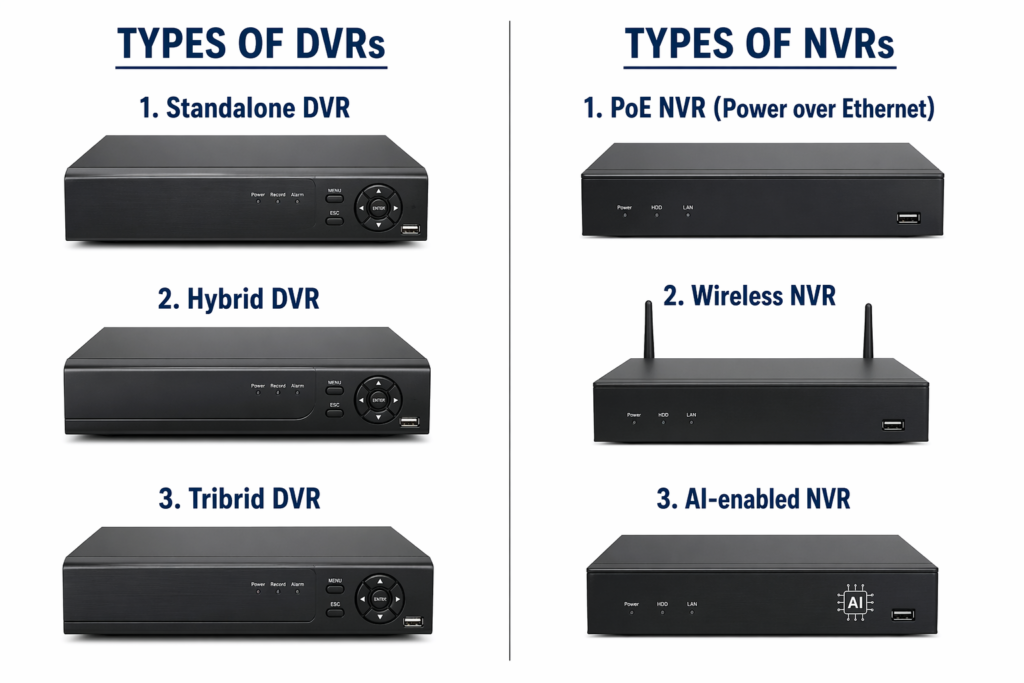
DVR vs NVR vs Hybrid Systems
| Type | Best For |
|---|---|
| DVR | Small budget setups |
| NVR | Modern smart security |
| Hybrid | Mix of analog + IP cameras |
Key Features of Modern DVR/NVR Systems
Remote viewing on a phone
Alerts for motion detection
Support for night vision
AI features like face detection and alerts for intrusions
Support for cloud storage
Recording in high resolution
DVR/NVR Channel Guide (4CH, 8CH, 16CH, 32CH Explained)
| Channels | Cameras Supported |
|---|---|
| 4CH | Up to 4 cameras |
| 8CH | Up to 8 cameras |
| 16CH | Up to 16 cameras |
| 32CH | Up to 32 cameras |
DVR/NVR Storage & Hard Disk Requirements
Storage depends on:
How many cameras
Quality of the recording
Hours of recording
For example:
4 cameras (HD): about 1TB for 7 to 10 days
8 cameras: about 2TB
👉 For better performance, always use an HDD that is made for surveillance.
DVR/NVR Installation Guide (Basic Steps)
- Install cameras
- Connect cables (coaxial or Ethernet)
- Connect DVR/NVR to monitor
- Install hard disk
- Power on system
- Configure settings
DVR/NVR Remote Viewing Setup
Get the mobile app
Scan the QR code from the DVR or NVR.
Get online
Log in and watch live video
Common DVR/NVR Problems & Solutions
| Problem | Solution |
|---|---|
| No video | Check cables |
| Hard disk error | Replace HDD |
| No remote access | Check internet |
| Camera not detected | Reconfigure settings |
DVR/NVR Accessories & Components
- Hard Disk (HDD)
- Power Supply
- CCTV cables
- Connectors
- Mouse/Monitor
- Network switch (for NVR)
Advantages and Disadvantages
DVR Pros:
- Low cost
- Easy to maintain
DVR Cons:
- Lower quality
- More wiring
NVR Pros:
- High-quality video
- Easy remote access
NVR Cons:
- Higher cost
DVR/NVR Use Cases
- Home security
- Office monitoring
- Shops & retail
- Warehouses
- Factories
Latest Trends in DVR/NVR Technology
- AI-based surveillance
- Cloud recording
- Smart alerts
- Mobile-first monitoring
- Integration with smart home systems
Buying Guide: How to Choose the Best DVR/NVR
Before buying, consider:
- Number of cameras
- Budget
- Storage needs
- Internet availability
- Required video quality
👉 Tip:
For small homes → DVR
For business or advanced security → NVR
FAQs About DVR/NVR Systems
1. What is the difference between DVR and NVR?
DVR works with analog cameras, while NVR works with IP cameras.
2. Which is better for home use?
DVR is good for budget homes, NVR for better quality.
3. Can DVR work without internet?
Yes, but remote viewing requires internet.
4. How many cameras can I connect?
Depends on channels (4CH, 8CH, etc.).
5. What hard disk is required?
Use surveillance HDD (1TB–4TB depending on usage).
6. Is NVR more expensive?
Yes, but it offers better features.
Final Thoughts
Both DVR and NVR are important for CCTV systems. Your choice depends on your budget, security needs, and future plans.
If you want a basic and affordable setup, go for DVR.
If you want a smart, high-quality, and future-ready system, choose NVR.